Telecom Fundamentals
Telecom Fundamentals for Deployment Engineers
Summary: This guide builds the mental model you need to think clearly about every Avaya migration — protocols, network requirements, analog devices, and E911. Not a comprehensive telecom course; just the pieces that will save you from making expensive mistakes.
Doc type: Concept Explainer | Audience: Deployment Engineer (new to telecom) | Platform: All platforms
Before You Start
This is a foundation document — read it before starting your first assessment. You don’t need to memorize it, but you do need to understand the concepts well enough to ask the right questions during a Stage 2 site visit.
What You’re Actually Replacing
When a customer is on Avaya, they have some combination of these components. Your job is to understand what they have before you touch anything.
The Avaya product lineup (you’ll encounter all of these)
| Product | What it is | Common size |
|---|---|---|
| IP Office 500 | Hybrid PBX — on-site box, up to 384 extensions | 10–150 seats |
| IP Office 500 V2 | Updated version, still the most common in the field | 10–250 seats |
| Avaya Aura | Enterprise-grade, distributed, often multi-site | 100–10,000 seats |
| Avaya ACE / AACC | Contact center layer on top of Aura | Varies |
| Avaya Cloud Office (ACO) | Their own UCaaS product (RingCentral white-label) | Any size |
| MERLIN / Partner | Very old systems — still alive in small businesses | 5–40 seats |
Why it matters: IP Office 500 and Aura have completely different migration complexity. IP Office is a box in a closet; Aura may be virtualized across multiple servers. Your assessment process is different for each.
The four technical layers — and what they mean for migration
| Layer | What it does | What breaks if you get it wrong |
|---|---|---|
| DIDs (phone numbers) | The actual digits customers call | Lost numbers, unreachable business |
| SIP trunking / PSTN connectivity | How calls get to/from the public network | No inbound or outbound calling |
| PBX / call control | Routes calls, manages voicemail, auto-attendants, hunt groups | Internal calling broken, call flows wrong |
| Endpoints | Desk phones, softphones, conference rooms | Users can’t make calls |
A UCaaS migration replaces all four simultaneously. The number one source of migration failures is assuming the customer’s existing setup matches what they told sales. It usually doesn’t.
The core protocols you need to recognize
SIP (Session Initiation Protocol) — The signaling layer for VoIP calls. Almost everything modern uses SIP. If a customer says “we have SIP trunks,” they mean their PSTN connectivity runs over the internet, not a physical analog line.
RTP (Real-time Transport Protocol) — The actual audio stream. SIP sets up the call; RTP carries the voice. Quality problems (choppy audio, echo, one-way audio) are almost always RTP issues, not SIP issues.
TLS / SRTP — Encrypted versions of SIP and RTP respectively. All UCaaS platforms use these by default. If the customer has a legacy firewall that can’t inspect TLS, that’s a blocker.
DTMF (Dual-Tone Multi-Frequency) — The tones your keypad generates. Matters for IVR navigation and for call recording de-scoping in PCI environments (DTMF suppression). If DTMF doesn’t pass correctly, voicemail navigation and phone trees break.
Codec — The algorithm that encodes voice. G.711 (PCM) = high quality, high bandwidth. G.729 = compressed, lower bandwidth, slight quality loss. G.722 = HD voice. All UCaaS platforms support G.711; not all support G.722. If you see one-way audio, codec mismatch is a likely culprit.
What “a phone number” actually is
A phone number in telecom is called a DID (Direct Inward Dial) or TN (Telephone Number). Numbers are owned by a carrier (AT&T, Spectrum Business, Comcast Business, Lumen, etc.). The customer is just a subscriber.
Number porting is the process of moving a number from one carrier to another while keeping the digits the same. The customer’s number doesn’t “live” on Avaya — it lives with their carrier. The Avaya system is just what answers it.
Key distinction: Porting replaces the carrier. Configuration replaces Avaya. Both happen during migration. They are separate workstreams with separate timelines.
Network concepts you must understand before touching anything
Bandwidth
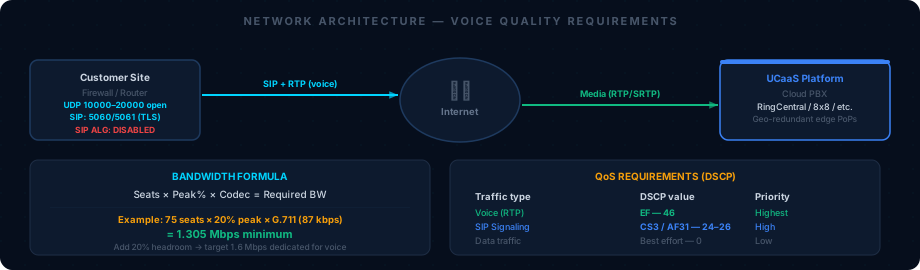
UCaaS requires roughly 100 kbps per simultaneous call (G.711). A 50-seat office with a 20% peak concurrency rate needs 50 × 0.2 × 100 kbps = 1 Mbps dedicated to voice. This sounds tiny until you realize many SMBs share an asymmetric cable connection with their general internet traffic.
Rule of thumb: Ask for a speed test. If download < 25 Mbps or upload < 10 Mbps for any site, flag it before committing to a go-live date.
QoS (Quality of Service)
Tells the router to prioritize voice packets over general internet traffic. If QoS isn’t configured, a large file download during a call will cause choppy audio. Most modern business routers support DSCP marking. Avaya uses DSCP EF (46) for voice; most UCaaS platforms inherit this. Check that the customer’s router/firewall honors it.
NAT (Network Address Translation)
Almost all business networks use NAT. Most UCaaS platforms handle NAT natively via STUN/TURN. The problem appears when the customer has a SIP-aware firewall (old Cisco, Fortinet with “SIP ALG” enabled) that tries to manipulate SIP packets and breaks them. Always ask: “Do you have SIP ALG enabled?” and “What firewall/router are you running?”
Firewall / port requirements
Every UCaaS platform publishes a list of ports and IP ranges that must be allowed. Common ports:
- UDP 5060 (SIP signaling, unencrypted)
- TCP/UDP 5061 (SIP-TLS)
- UDP 10000–20000 (RTP media — this is a wide range, must be open bidirectionally)
- TCP 443 (admin portals, softphone connectivity)
- TCP 80/443 outbound (provisioning)
Get the customer’s firewall rules before you commit to a timeline. A managed firewall with a slow change-control process can add 2 weeks to a migration.
Analog devices — the hidden complexity
Analog devices are the #1 source of last-minute surprises. These are devices connected to the Avaya system via analog ports (FXS) that are NOT VoIP:
| Device type | Why it’s a problem |
|---|---|
| Fax machines | Fax-over-IP (FoIP) using T.38 protocol — not all UCaaS platforms support it natively; may need a fax-to-email gateway |
| Overhead paging | Paging systems typically connect via analog; requires SIP paging adapter (Algo, CyberData) on UCaaS |
| Elevator phones | Often analog POTS lines, not connected to PBX at all — stay with carrier, not migrated |
| Door phones / entry systems | Some connect to Avaya via analog; need SIP door phone adapter |
| Credit card terminals | Some older terminals use analog POTS for dial-up — NOT migrated, must stay on POTS lines |
| Alarm systems | Often use analog POTS lines to call monitoring centers — NOT migrated |
Ask about every analog device in your Stage 2 assessment questionnaire. The customer will always forget at least one.
The E911 requirement
E911 (Enhanced 911) routes emergency calls to the correct local PSAP (Public Safety Answering Point) and provides the caller’s location. On Avaya, E911 is tied to the physical location of the phone jack.
On UCaaS, E911 is tied to the extension/user record in the platform, not the physical jack. This creates two problems:
-
Multi-location: A user with a softphone working from home dials 911. Which PSAP does it go to? If their extension is registered to the main office address, first responders go to the wrong building. Every user must have a registered E911 location.
-
Mobile / remote work: Same problem. The platform needs either a dynamic E911 service (like Bandwidth 911, RedSky, Intrado) or a strict policy about location registration.
Every migration ends with an E911 test. Dial 933 (test code for E911 location readiness on most platforms) from each site and verify the address reads back correctly. This is non-negotiable.
What “Call Quality” Means in Numbers
| Metric | Good | Acceptable | Problem |
|---|---|---|---|
| MOS (Mean Opinion Score) | ≥4.0 | 3.5–3.9 | <3.5 |
| Jitter | <20ms | 20–40ms | >40ms |
| Latency (one-way) | <100ms | 100–150ms | >150ms |
| Packet loss | <1% | 1–3% | >3% |
You’ll measure these using the platform’s built-in analytics, or via a tool like iPerf or PingPlotter during the network readiness check in the Stage 2 assessment.
“This dashboard is your post-go-live quality baseline. If numbers are in the ‘Problem’ range before you start, the customer has a network issue that must be fixed before migration — not after.”
If any metric is in the Problem range before migration begins, document it as a risk and make network remediation a prerequisite for the go-live date.
Related Articles
- 03 — Assessment and Discovery — Applies all concepts in this doc during a real site survey
- Knowledge Base: Network Requirements — Bandwidth calculator, QoS config steps, firewall port list
- Knowledge Base: E911 Reference — Full E911 configuration and testing steps
- 07 — Troubleshooting Guide — Issues 1–4 cover the network and protocol problems introduced here