Number Porting
Manage Number Porting from LOA to Go-Live
Summary: This guide walks you through every stage of the porting process — from collecting the LOA to confirming a clean port on cutover night. Porting is the riskiest, most time-sensitive piece of every migration.
Doc type: How-To Guide | Audience: Deployment Engineer (technical) | Platform: porting_tracker.py CLI + carrier porting portals
Before You Start
- The customer’s HubSpot deal is in Stage 3 (Proposal) or later
- You have a copy of the customer’s most recent carrier invoice — not the customer’s memory of their account number
- You have access to the
porting_tracker.pyCLI script and the migration UUID for this project - You know which UCaaS platform (winning carrier) you are porting to, and you have their porting team contact
A porting delay means a delayed go-live. Start the porting process the day the deal moves to Stage 3 — not at Stage 4 when everything else is being configured.
What Porting Is
A phone number belongs to a carrier, not a customer. When a customer changes carriers, they “port” the number — the FCC requires carriers to allow this within defined timelines. The customer keeps their digits; only the underlying carrier changes.
Vocabulary you must know:
| Term | Definition |
|---|---|
| DID / TN | Direct Inward Dial / Telephone Number — the actual phone number |
| Losing carrier | The carrier who currently holds the number |
| Winning carrier | The carrier receiving the number (the UCaaS platform you are deploying) |
| LOA | Letter of Authorization — the customer’s legal authorization for the winning carrier to take the number |
| CSR | Customer Service Record — the official account record at the losing carrier |
| FOC | Firm Order Commitment — the exact date and time the losing carrier commits to releasing the number |
| Port day | The day and time the number moves; matches the FOC |
| Cutover | The moment the live environment switches over to the new platform |
The Porting Lifecycle — 5 Stages
Stage 1: LOA Pending       → collect and submit the LOA
Stage 2: LOA Submitted     → submitted to winning carrier's porting team
Stage 3: FOC Received      → losing carrier committed to a specific date and time
Stage 4: Port Day          → the number moves at the FOC time
Stage 5: Complete          → port confirmed, old number decommissioned
Track every porting order in the system. Every command updates Supabase and emits to Splunk.
# Create a port order for this migration
python3 execution/porting_tracker.py --action create \
    --migration-id <uuid> \
    --numbers "415-555-0100,415-555-0101,415-555-0102" \
    --carrier "Spectrum Business"

# Check current stage
python3 execution/porting_tracker.py --action status --migration-id <uuid>

# Advance stage when FOC is received from the carrier
python3 execution/porting_tracker.py --action update \
    --migration-id <uuid> \
    --stage foc_received \
    --foc-date "2026-06-15"

# Print the port-day checklist
python3 execution/porting_tracker.py --action checklist --migration-id <uuid>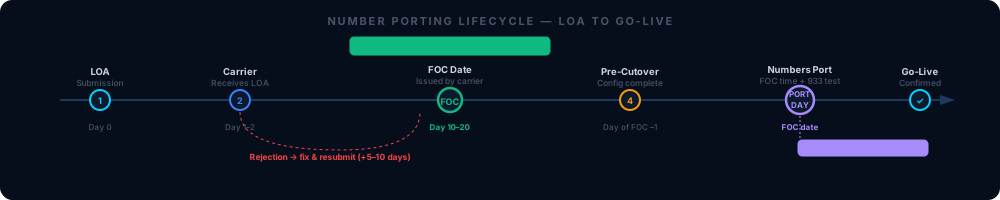
“Run this command whenever you need to verify the current porting stage. The status field tells you exactly where you are in the 5-stage lifecycle.”
You should see after running
--action create: A confirmation line showing the port order ID and the initial statusloa_pending. Verify this in Supabaseporting_orderstable — a row should appear within 30 seconds.
Step 1 — Collect the LOA
The Letter of Authorization is the legal document the customer signs authorizing the winning carrier to take their number. Without it, nothing moves.
Every LOA must include all of the following — if any field is wrong, the LOA will be rejected:
- Customer’s legal business name — must match the losing carrier’s records exactly. “Acme Corp” and “Acme Corporation” are different.
- Service address — must match the address on file at the losing carrier, including suite number and abbreviation format
- Account number — get from the most recent carrier invoice, not from the customer’s memory
- Billing Telephone Number (BTN) — the main number on the account; also on the invoice
- Authorized signature — must be from the account owner, not just any employee
“Use the LOA template in sales-toolkit/contracts/. Every field matters — a single mismatch causes a rejection that adds 5–10 business days.”
Before you submit the LOA: Have the customer call their carrier and verbally confirm: their account number, their BTN, and the exact legal name on the account. This 10-minute call prevents 2-week delays.
Where to submit the LOA: Most UCaaS platforms have an online porting portal where you upload the LOA directly. Log into the winning carrier’s partner portal and navigate to Number Porting or Port-In Requests. The supplier-specific portals are documented in 05 — Platform Configuration.
After submitting, advance the stage:
python3 execution/porting_tracker.py --action update \
    --migration-id <uuid> --stage loa_submitted
You should see: Status changes to
loa_submittedin the tracker output. The winning carrier’s porting team will send an email confirmation within 1–2 business days acknowledging receipt.
Step 2 — Wait for FOC
The winning carrier sends the LOA to the losing carrier. The losing carrier reviews it and, if accepted, issues a Firm Order Commitment (FOC) — the exact date and time they will release the number.
FOC timelines by carrier type:
| Carrier type | Typical FOC timeline | Notes |
|---|---|---|
| Major ILECs (AT&T, Verizon, Lumen/CenturyLink) | 15–20 business days | More predictable, larger bureaucracy |
| Major CLECs (Spectrum Business, Comcast Business, Cox) | 10–15 business days | Varies by market — Comcast is slower in major metros |
| National wireless (Verizon Wireless, AT&T Wireless, T-Mobile) | 3–5 business days | Significantly faster than wireline |
| Small CLECs / regional carriers | 20–30 business days | Unpredictable — plan for the longest estimate |
| Toll-free numbers | 3–5 business days | Managed via SOMOS RespOrg transfer, usually faster |
Build your go-live date around the FOC timeline — not the other way around. If the customer wants to go live in 2 weeks and their carrier needs 15 business days, the answer is “minimum 5 weeks.” Do not negotiate the porting timeline. The carrier controls it.
When the FOC is received, advance the stage:
python3 execution/porting_tracker.py --action update \
    --migration-id <uuid> \
    --stage foc_received \
    --foc-date "2026-06-15"
You should see: Status changes to
foc_receivedand thefoc_datefield populates in the tracker. Call the winning carrier’s porting team to verbally confirm the FOC date and time — do not rely solely on an email or portal notification. Mismatches between the email and the actual port time are rare but they happen.
Step 3 — Prepare for Port Day
Work backward from the FOC time:
| Time Before/After FOC | Action |
|---|---|
| FOC day −7 | Full platform configuration complete; all users tested on temporary numbers |
| FOC day −3 | Pre-cutover call with customer; confirm they know what to expect |
| FOC day −1 | Final checklist review; FOC confirmation number on file |
| FOC day, −2 hours | Monitoring channels open; all contacts reachable |
| FOC time | Numbers begin to port — monitor the call log |
| FOC + 15 min | Call test every ported number from an outside line |
| FOC + 60 min | E911 test (dial 933) at every site |
| FOC + 4 hours | Run Splunk health check |
| FOC + 48 hours | Decommission old PSTN trunk |
Run the port-day checklist from the system:
python3 execution/porting_tracker.py --action checklist --migration-id <uuid>Toll-Free Number Porting
Toll-free numbers (800, 888, 877, 866, 855, 844, 833) are managed separately from regular DIDs through SOMOS, the North American toll-free database. The entity that manages a toll-free number is called its RespOrg (Responsible Organization).
To port a toll-free number:
- Have the customer identify their current RespOrg ID — visible on their carrier invoice
- Submit a separate LOA for the toll-free number, authorizing the winning carrier to become the new RespOrg
- The winning carrier initiates a RespOrg change in SOMOS
Toll-free porting typically takes 3–5 business days. Create a separate line item in porting_tracker.py for toll-free numbers — do not group them with wireline DIDs.
Multi-Carrier Porting
If the customer has numbers spread across multiple carriers (common after acquisitions or office moves):
- Create one port order per carrier account in
porting_tracker.py - Submit one LOA per carrier account — one LOA cannot cover multiple carriers
- Request the same target port date from each carrier — they will rarely all align exactly; plan for a 1–3 day stagger
- If any numbers are on different accounts at the same carrier (different BTNs), treat each account as a separate carrier
“Multi-carrier ports require separate tracking. The migration is not ready for cutover until all port orders show foc_received and all FOC dates are confirmed.”
Keep the Old PSTN Trunk Live for 48 Hours
After the port completes, the Avaya system’s PSTN trunk remains active for 48 hours. Do not decommission it until the 48-hour window passes.
Why: If anything is catastrophically wrong after cutover, you can call the winning carrier’s porting NOC and request an emergency port-back — a reversal of the port. This is only possible within the first 48 hours. After that, you must go through the full porting process again (new LOA, new FOC, another 10–20 business days).
After 48 hours with no issues, decommission the trunk with customer confirmation:
python3 execution/porting_tracker.py --action update --migration-id <uuid> --stage completeWhen Things Go Wrong
LOA rejected: The winning carrier’s porting team sends back a rejection with a reason code. Fix only the specific field that caused the rejection. Do not resubmit the same LOA — it will be rejected again. See the rejection code table in Knowledge Base: Porting Reference.
FOC date slips: The losing carrier delays the committed date. Communicate to the customer immediately — adjust the go-live date. Document the new FOC in HubSpot and update porting_tracker.py.
Port fails on port day: The number was supposed to move at the FOC time but calls still route to Avaya. Call the winning carrier’s porting NOC immediately — do not wait until business hours. Keep the old system running. Most port failures resolve within 24 hours. See 07 — Troubleshooting, Issue 6.
Number ported but calls don’t work: The number moved but the platform isn’t routing it correctly. This is a platform configuration issue, not a porting issue. Check: is the DID assigned to the correct user or hunt group in the Admin Console? Is the inbound route pointing to the correct destination?
Partial port: Some numbers ported, some didn’t. Treat the un-ported numbers as a new porting order and start the LOA process again for those numbers only. Document which numbers are live on which platform and keep the customer informed.
Carrier Porting Escalation Contacts
Get these numbers before port day. Regular customer service cannot help you at 4am when a port fails. You need the dedicated porting NOC line.
| Carrier | Porting escalation | Notes |
|---|---|---|
| AT&T Business | Request through winning carrier’s porting team (IXC liaison) | Winning carrier escalates to AT&T on your behalf |
| Spectrum Business | 833-914-1800 (partner porting line) | Business hours; after-hours through partner NOC |
| Comcast Business | Through winning carrier escalation | Winning carrier has an established escalation path |
| Verizon Business | Through partner account team | Request the porting NOC number from your account manager |
The winning carrier’s porting team is your primary escalation for any porting issue. They have established relationships with all losing carriers and can escalate faster than you can directly.
What to Do If Something Goes Wrong
| Problem | First action | Full reference |
|---|---|---|
| LOA rejected | Fix the specific rejected field, resubmit | Knowledge Base: Porting Reference |
| FOC date slips | Notify customer, update go-live date, update tracker | 07 — Troubleshooting, Issue 6 |
| Port doesn’t happen at FOC time | Call winning carrier porting NOC immediately | 07 — Troubleshooting, Issue 6 |
| Partial port | Create new order for remaining numbers | 07 — Troubleshooting, Issue 7 |
Related Articles
- Knowledge Base: Porting Reference — Detailed carrier timelines, rejection code table, port-back process, multi-carrier strategy
- 06 — Cutover Playbook — Port-day runbook, hour by hour from T−60 minutes
- Cutover Day Checklist — Print-and-carry companion for port day
- 07 — Troubleshooting Guide — Issues 5, 6, 7 cover porting failures in detail
- 03 — Assessment and Discovery — Where you inventory the DIDs before porting begins