Cutover Day Checklist
Cutover Day Checklist
Summary: Work through this checklist in real time during the cutover window. Every box must be checked before you declare the migration complete.
Doc type: Operational Checklist | Audience: Deployment Engineer (technical) | When to use: Starting T−60 minutes before the FOC time. Print this — do not rely on a laptop screen.
Before You Start
- The Pre-Migration Checklist (
pre-migration-checklist.md) is fully signed - You have the FOC date and time confirmed in writing from the carrier porting team
- You have the carrier porting NOC number written on paper — not just saved in your phone
- The old Avaya PSTN trunk is active and has not been decommissioned
- You have texted your on-call manager to confirm they’re reachable tonight
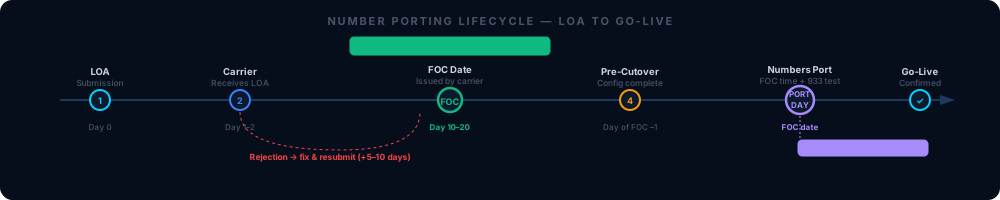
“Confirm status is foc_received before starting T−60 tasks. Any other status means something has gone wrong — call the carrier NOC and resolve before proceeding.”
Migration ID: ____________________________
Customer: ____________________________
FOC date/time: ____________________________
Cutover window: ____________ to ____________
DE: ____________________________
T−60 Minutes: Pre-Flight
-
- Text customer IT contact now. Confirm they’re awake and their phone is working.
-
- Confirm porting tracker status is
foc_received:
python3 execution/porting_tracker.py --action status --migration-id <uuid>You should see:
status: foc_receivedand the FOC timestamp. If status is anything else, stop and resolve before proceeding. - Confirm porting tracker status is
-
- Open the UCaaS Admin Console → Users. Confirm all users show status Active. Any Unregistered user must be resolved before port time.
-
- Open the n8n Executions tab. Confirm no migration workflows are showing active failures.
-
- Open Splunk. Run
index=avaya migration_id="<uuid>". Confirm recent events are flowing.
You should see: Log events from the past 24 hours (provisioning, pre-flight checks). If the query returns nothing, the Splunk HEC connection may be down — check
ssh thinkpad "docker ps | grep splunk"before continuing. - Open Splunk. Run
-
- Post in #migrations Slack:
“Starting cutover for [CUSTOMER NAME] at [TIME]. Migration ID: [UUID]”
-
- Confirm emergency contacts are written on paper:
- Carrier porting NOC:
____________________________ - UCaaS platform NOC:
____________________________ - Customer IT primary:
____________________________ - Customer executive:
____________________________ - Manager on-call:
____________________________
-
- Confirm the old Avaya system and its PSTN trunk are fully operational. Do not touch the Avaya system until T+48h.
T−30 Minutes: Final Verification
-
- From the new platform, call your own cell phone. Confirm audio quality is clear in both directions.
You should hear: No choppiness, no echo, no one-way audio. If audio is degraded, check QoS and SIP ALG settings immediately.
-
- Have someone call a temporary DID (not the ported main number) on the new platform. Confirm it rings the correct destination.
-
- Navigate each auto-attendant option from an outside call to the temporary DID. Confirm every option routes correctly.
-
- In the Admin Console, confirm all analog device adapters (ATAs) are showing as Registered.
-
- In the Admin Console → Devices, confirm all desk phones show Registered. Note any showing Unregistered — resolve now.
At FOC Time: The Port
-
- Note exact clock time the FOC window opens:
____________
- Note exact clock time the FOC window opens:
-
- Open Admin Console → Activity or Call Logs and begin monitoring.
-
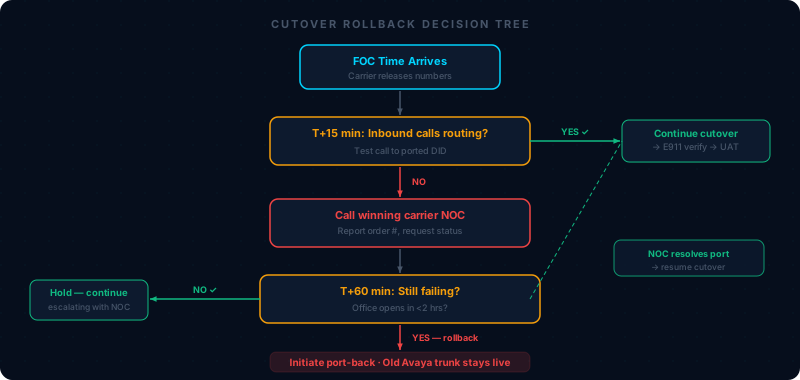
- Wait. Do not make any configuration changes. The carrier is routing your numbers in their system — this takes 5–15 minutes from the FOC time.
“This is the moment. When you see the first inbound call to a ported number appear in the call log, the port is live. Time this from the FOC window — 5-15 minutes is normal. More than 30 minutes means
You should see: The first inbound call on a ported number in the call log within 15 minutes of FOC time. If nothing appears within 30 minutes — skip to If Something Goes Wrong below.
T+15 Minutes: First Call Tests
-
- Call the main ported number from an external cell phone (not connected to the customer network). Record the result:
- Rings at (destination):
____________________________ - Time from dial to answer:
____________________________seconds
-
- Call each ported number from an outside line. Record result for each:
Ported Number Rings Correct Destination Caller ID Correct on Outbound ____________________[ ] ✅ [ ] ❌[ ] ✅ [ ] ❌____________________[ ] ✅ [ ] ❌[ ] ✅ [ ] ❌____________________[ ] ✅ [ ] ❌[ ] ✅ [ ] ❌____________________[ ] ✅ [ ] ❌[ ] ✅ [ ] ❌You should see: Every ported number routing to the correct destination within 3–4 rings, and outbound calls showing the customer’s main number as caller ID.
-
- Leave a voicemail from an outside line. Confirm the voicemail email arrives at the correct address within 5 minutes.
If email doesn’t arrive: have the user check spam. Whitelist the platform’s sending domain. See 07 — Troubleshooting, Issue 10.
T+30 Minutes: Feature Verification
-
- Auto-attendant: Call the main ported number from an outside line. Navigate every menu option. Confirm each routes to the documented destination. ✅
-
- Hunt groups: Call each hunt group DID from an outside line. Confirm the call rings members in the correct order and overflows correctly. ✅
-
- Call hold and resume: Hold an active call, resume it, confirm audio is intact. ✅
-
- Call transfer: Perform a blind transfer and an attended transfer. ✅
-
- Fax:
[ ] Sent and received test fax on the fax DID ✅ [ ] N/A
- Fax:
-
- Paging:
[ ] Paged from a desk phone — audio confirmed at all zones ✅ [ ] N/A
- Paging:
-
- Call recording:
[ ] Made a recorded call — recording appears in Admin Console within 2 minutes ✅ [ ] N/A
- Call recording:
-
- Mobile app:
[ ] Called from mobile app on LTE — audio quality confirmed ✅ [ ] N/A
- Mobile app:
T+60 Minutes: E911 Verification
Mandatory. Do not skip under any circumstances — including time pressure.
-
For each site, pick up a desk phone physically located at that site. Dial 933 (FCC E911 test — does NOT dispatch emergency services).
You should hear: “Your emergency address is: [street address, suite, city, state].” Confirm this matches the correct physical location of the site — not headquarters.
Site Physical Address 933 Read Back Correct? Tested By ____________________________________________________________[ ] ✅ [ ] ❌____________________________________________________________________________[ ] ✅ [ ] ❌____________________________________________________________________________[ ] ✅ [ ] ❌________________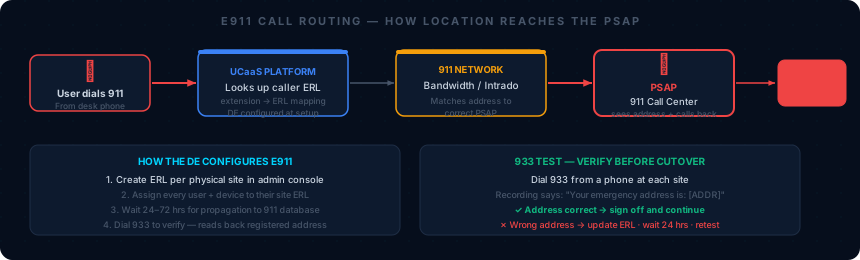
“If 933 reads back the wrong address, update the ERL in this screen immediately. ERL changes propagate in 24–72 hours — if you’re inside that window, contact the platform’s E911 support for a manual e
If any E911 address is wrong: Update the Emergency Response Location in Admin Console → Emergency Services → Locations immediately. Document the discrepancy and resolution in Supabase. Do not leave incorrect E911 data unresolved.
T+4 Hours: Health Check
-
- Check Splunk for errors:
index=avaya migration_id="<uuid>" level=error
You should see: Zero or near-zero error events. Investigate any error logs before declaring the migration healthy.
- Check Splunk for errors:
-
- Run the automated health check:
python3 execution/health_check.py --migration-id <uuid> \
  --metrics '{"mos":<value>,"jitter":<value>,"latency":<value>,"packet_loss":<value>}'
Health check score:
_______ / 100(target: 80 or above) -
- Update porting tracker to
port_day:
python3 execution/porting_tracker.py --action update --migration-id <uuid> --stage port_day - Update porting tracker to
-
- Update Supabase migration status to
"live".
- Update Supabase migration status to
-
- Post in #migrations:
“[CUSTOMER NAME] is live. All [N] sites confirmed. E911 verified. Score: [X]/100. Migration ID [UUID] ✅“
If Something Goes Wrong
Partial failure (some numbers or features not working):
- Continue operating while fixing — the majority of users can still work
- Document every issue in #migrations as you find it
- Call the customer IT contact with a status update within 30 minutes of identifying any issue
Major failure (majority of users cannot make or receive calls):
-
- Do NOT decommission old Avaya system — the PSTN trunk is still live
-
- Call carrier porting NOC NOW:
____________________________— request emergency port reversal (48h window)
- Call carrier porting NOC NOW:
-
- Call customer IT contact: “We’ve hit an issue and are restoring your old system. All calls are working now. We’ll reschedule once we’ve resolved this.”
-
- Post in #migrations:
ROLLBACK INITIATED — [CUSTOMER NAME] [UUID] — [describe issue]
- Post in #migrations:
-
- Call manager:
____________________________
- Call manager:
-
- Update HubSpot deal back to Stage 5 (Migration Execution)
T+48 Hours: Closeout
-
- Called customer IT contact before 9am: “How is everything working today? Any reports of issues?”
-
- Reviewed Splunk for overnight errors on this
migration_id
- Reviewed Splunk for overnight errors on this
-
- Decommissioned old Avaya PSTN trunk — confirmed verbally with customer before doing this
-
- Porting tracker updated to complete:
python3 execution/porting_tracker.py --action update --migration-id <uuid> --stage complete -
- Supabase migration status updated to
"complete"
- Supabase migration status updated to
-
- HubSpot deal moved to Go-Live stage
You should see: n8n workflow 904 fires automatically, scheduling Day 7, Day 30, and Day 60 health check notifications. Confirm in the n8n Executions tab within 5 minutes of moving the deal stage.
-
- “You’re officially migrated” email sent to customer executive and IT contact
-
- Day 7 health check call scheduled:
____________________________
- Day 7 health check call scheduled:
Cutover Complete Sign-Off
DE: _______________________
Date: _______________
Time cutover started: _______________
Time migration declared live: _______________
Final health score: _______ / 100
Related Articles
- 06 — Cutover Playbook — Full narrative playbook; read before cutover night
- Pre-Migration Checklist — Gate that must be signed before this checklist applies
- 07 — Troubleshooting Guide — Full diagnosis steps for every issue you may encounter
- Knowledge Base: E911 Reference — Platform-specific E911 config and 933 test details
- Knowledge Base: Porting Reference — Port-back process, carrier NOC contacts
- Post-Migration Checklist — Day 7, Day 30, and Day 60 follow-through