Assessment And Discovery
Run a Complete Stage 2 Assessment
Summary: This guide walks you through all 8 sections of the Stage 2 assessment — the site survey that surfaces every risk before you commit to a go-live date. Everything that can go wrong in a migration was knowable in Stage 2.
Doc type: How-To Guide | Audience: Deployment Engineer (technical) | Platform: Avaya IP Office Manager + customer’s network tools + compliance_checker.py
Before You Start
- The HubSpot deal is in Stage 2 (Assessment)
- You have a 1–2 hour block with the customer’s IT admin (screen share or on-site)
- You have access to the
compliance_checker.pyCLI script and the migration UUID - The customer has agreed to provide: a copy of their carrier invoice, admin access to their Avaya system, and a list of all sites with physical addresses
Do not commit to a go-live date until this assessment is complete, documented, and reviewed. A go-live date before the assessment is a guess — and the migration will pay for that guess.
Why the Assessment Is the Most Important Step
Migrations fail for two reasons:
- Something was discovered on go-live day that should have been found in Stage 2
- The customer’s network couldn’t support UCaaS
Both are preventable with a thorough assessment. The assessment is your only protection.
Section 1 — Avaya Environment Inventory
Goal: Understand exactly what Avaya system you are replacing.
| Item | How to collect it | Why it matters |
|---|---|---|
| Avaya product and version | System Manager, label on the chassis, or customer IT | Configuration steps differ significantly by product |
| License count | Avaya license server or IP Office Manager | Sets your maximum seat count |
| Extension range | IP Office Manager → Extensions tab | Extensions ≠ seats — know both |
| Current firmware version | System Manager | Determines whether active maintenance obligations affect migration timing |
| Admin credentials | Customer IT | You need read-only access to export call flows |
| Voicemail system | IP Office: Embedded, Essential, Preferred, or Select | Determines voicemail migration complexity |
To access Avaya IP Office (most common):
- Open a web browser on the customer’s network
- Navigate to
https://<avaya-ip>:7070 - Log in with the admin credentials provided by customer IT
Default credentials: username
Administrator/ passwordadmin— these are often changed. If the customer’s IT can’t provide access, have them export a.cfgconfiguration backup and share the file.
“The Extensions view in IP Office Manager shows every extension — including hunt groups, auto-attendants, and special ports that don’t appear in the seat count. Export this list as CSV before closing
You should see: A complete list of extensions, users, and device types. If the customer claims 50 seats but IP Office shows 80 extensions, that’s your first risk to document.
If IP Office Manager is unavailable: Ask the customer to export the system configuration: File → Export → Configuration. This .cfg file can be read offline and contains all extension, user, and call flow data.
Section 2 — User and Extension Inventory
Goal: Build the complete user list that will be imported into the new UCaaS platform.
Request a CSV from the customer’s IT team containing:
- Extension number
- User name
- Email address (for voicemail-to-email and platform account creation)
- Department
- Location (for multi-site deployments)
- Device type (desk phone model, softphone, analog phone)
- Special features (call recording enabled, call center agent, supervisor)
If the customer can’t produce a CSV: Get read-only access to IP Office Manager and export it yourself. Do not rely on the customer’s verbal description — they will forget people, remote workers, and conference room phones.
For multi-site deployments — collect for each site:
- Physical address (exact — used for E911 Emergency Response Locations)
- Number of extensions at that site
- Local IT contact name and phone number
- Network details: ISP, connection type, download/upload speed, router and firewall model
Section 3 — Phone Number Inventory
Goal: Know every number that needs to be ported before the porting timeline begins.
Request a copy of their carrier invoice from the last 3 months.
Collect from the invoice:
- Every DID (Direct Inward Dial) they own — list each one
- Which carrier each number is with (there may be multiple carriers)
- Whether any numbers are toll-free (800, 888, 877, 866, 855, 844, 833) — these port separately
- Which numbers are associated with fax machines — they may need different handling
Pro tip: Ask the customer to check phone bills for the last 3 months, not just the most recent one. Customers often have carrier relationships from old offices or acquisitions that they’ve forgotten about. Discovering a missed number on port day adds 10–20 business days.
Section 4 — Analog and Special Device Inventory
Goal: Find every device that plugs into an analog phone port — these don’t automatically migrate to UCaaS.
Walk through this checklist with the customer’s IT team, room by room. Ask to physically visit each floor if possible — “we only have one fax machine” often becomes three when you walk the floor.
- Fax machines — How many? Where? Which number? Disposition: eFax / T.38 ATA / retire?
- Overhead paging — How many zones? How is it connected to the Avaya? (IP paging adaptor or analog?)
- Door phones / intercom — Connected to Avaya? Model number?
- Elevator phones — POTS line or connected to the Avaya system?
- Alarm / security panel — Phone line type? (POTS is common — leave on POTS)
- Credit card terminals — Dial-up (analog) or IP-based? Dial-up terminals stay on POTS.
- Recorded announcement lines — Connected to Avaya or standalone equipment?
- Conference room A/V systems — SIP-based (Poly Trio, Cisco) or analog?
“Walk each floor with the IT admin and mark every device. The customer doesn’t always know what’s in unused offices, storage rooms, or elevator banks.”
For each analog device that must be migrated, document: device model, the Avaya port it’s connected to, and the disposition (ATA adapter, SIP replacement, or remain on POTS). These decisions feed directly into Section 4 of the Pre-Migration Checklist.
Section 5 — Call Flow Documentation
Goal: Rebuild the customer’s complete call routing logic in writing before touching any configuration.
This is the most time-consuming but most critical section. Get it wrong and calls go to the wrong place on go-live day.
For each main business number, document the complete routing tree:
Inbound number: (415) 555-0100
↓
Auto-attendant greeting: "Thank you for calling Acme Corp..."
  Press 1: Sales → Hunt Group "Sales" (ext 201, 202, 203, 204 — sequential, 20s each)
  Press 2: Support → Hunt Group "Support" (ext 301, 302, 303)
  Press 3: Billing → ext 105 direct (Karen)
  Press 0: Operator → ext 100 (Reception)
  No press after 10s: → Operator
  After hours (Mon–Fri after 6pm, all weekend): → Voicemail box 5000 (main mailbox)
  Holidays: → Announcement "We are closed for the holiday" → Voicemail 5000

Hunt Group "Sales":
  Ring type: Sequential (201 → 202 → 203 → 204)
  Ring time per member: 20 seconds
  All members unavailable: → Voicemail box 201
Repeat this documentation for every auto-attendant, hunt group, coverage path, and special routing scenario (holidays, after-hours, emergency).
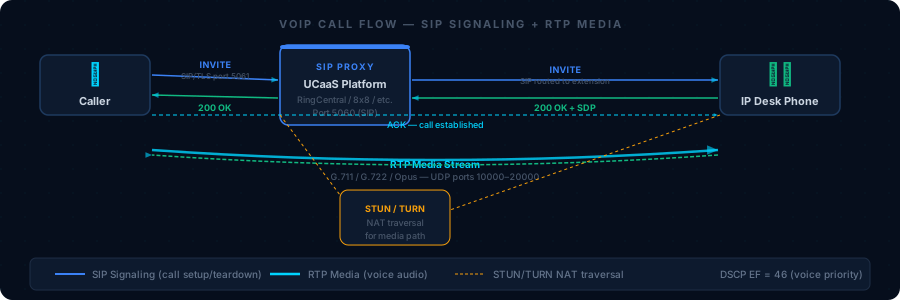
“A call flow diagram is worth 1,000 configuration steps. Build it during the assessment, review it with the customer to confirm it’s correct, then use it as the blueprint for platform configuration.”
Tip: Ask the customer’s IT admin to screen-share the IP Office Manager while you document. Never accept a verbal description alone — the documented configuration and the customer’s understanding of it are often different.
Section 6 — Integrations Inventory
Goal: Identify every system connected to the phone system that will break on cutover day if not accounted for.
| Integration type | What to ask | Notes |
|---|---|---|
| CRM | Salesforce, HubSpot, Zoho — click-to-dial or screen pop? | RingCentral and 8x8 have native integrations; others use middleware |
| Helpdesk | ServiceNow, Zendesk, Freshdesk — does a call automatically create a ticket? | Usually API-based; varies by UCaaS platform |
| Call recording | Separate recording platform (NICE, Verint, Calabrio) or Avaya-native? | Third-party recording platforms need separate evaluation and may not integrate with all UCaaS platforms |
| Call accounting | TAPIT, ISS, Verex Director? | These pull from Avaya’s SMDR output — may need to be replaced with the UCaaS platform’s analytics |
| E-fax | Already using eFax or RingFax? Or all physical fax? | Existing eFax setup simplifies migration |
| Directory / LDAP | Active Directory integration for phone book? | Most UCaaS platforms support AD/Azure AD sync |
| Contact center | Avaya AACC, Avaya Elite, or IP Office Contact Center? | Contact center migrations are a separate scope — flag and escalate to your manager |
For any integration that needs to work on the new platform, document: what the integration does, what API or protocol it uses, and whether the proposed UCaaS platform supports it. Flag any integration that can’t be replicated as a risk.
Section 7 — Network Readiness
Goal: Determine if the customer’s network can support UCaaS before you commit to a go-live date.
Run all tests from inside the customer’s network during business hours — not at night when traffic is low.
# Bandwidth test — run from a PC inside the customer network
# Use speedtest.net or fast.com
# Minimum required: 100 kbps upload per concurrent call
# For 50 seats at 20% concurrency: 10 concurrent calls × 100 kbps = 1 Mbps upload minimum

# Latency and jitter test (Windows)
ping 8.8.8.8 -n 200 -l 160
# Target: average <100ms, jitter <20ms, 0% packet loss

# Traceroute to the UCaaS platform's SIP server
tracert sip.ringcentral.com  # substitute the correct platform domain
# Target: <15 hops, no single hop >50ms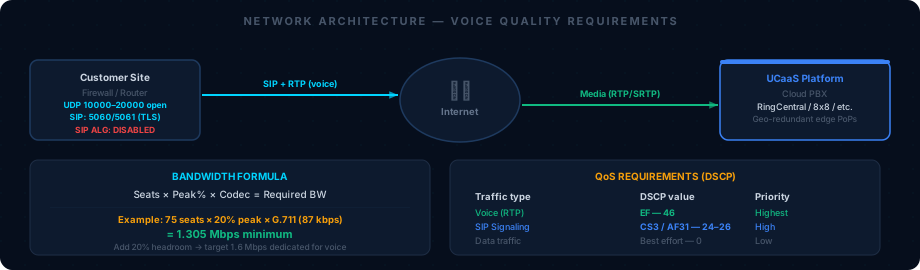
“A T1 line (1.544 Mbps) cannot support more than 12 concurrent calls using G.711 (100 kbps each). If the customer has a T1 and more than 60 seats, network upgrade is a prerequisite — not optional.”
You should see: Upload bandwidth at least 1.5× the calculated minimum (2× preferred). Jitter under 20ms. Zero packet loss. If any metric fails, document it as a risk and recommend remediation before go-live.
Questions for the network/IT team:
- What router and firewall model are you running?
- Is SIP ALG enabled? (The answer should be “no” — if yes, it must be disabled before go-live)
- Is QoS/DSCP marking configured for voice traffic?
- Is there a dedicated voice VLAN on managed switches?
- Are PoE switch ports available for desk phones?
- What is your ISP and connection type (fiber, cable, T1, SD-WAN)?
- Do you have a secondary or failover internet connection?
Section 8 — Compliance Requirements
Goal: Detect the compliance vertical and document any Stage 3 requirements that must be addressed before the proposal is signed.
Run the compliance detector:
python3 execution/compliance_checker.py --migration-id <uuid> --industry "<customer_industry>"You should see: The detected compliance vertical printed to stdout, and the Stage 3 requirements listed. If no vertical is detected, no additional compliance work is required.
Then confirm with the customer:
| Industry | Vertical | Package name | Immediate implication |
|---|---|---|---|
| Healthcare, medical, clinic | HIPAA | HealthComm | BAA required before go-live; PHI inventory needed |
| Financial, banking, insurance | PCI-DSS | SecureVoice | Call recording must be de-scoped before go-live |
| Government, federal, municipal | FedRAMP | GovConnect | Platform must have FedRAMP authorization |
| Education, university, K-12 | FERPA | EduComm | Student data policy review required |
See 08 — Compliance Requirements for the full Stage 3 and Stage 5 sign-off requirements per vertical.
Assessment Output — The Summary Document
At the end of Stage 2, produce one document and save it to the Google Drive deal folder. Brief (1–3 pages) and must answer these questions exactly:
MIGRATION ASSESSMENT SUMMARY
Customer: [Name]
Migration ID: [UUID]
Date: [Date]
DE: [Your name]

ENVIRONMENT
  Avaya product: [IP Office 500 V2 / Aura / etc.]
  Seat count: [N]
  Extension count: [N] (includes non-user extensions)
  Sites: [N] ([City 1], [City 2], ...)

NUMBERS
  DID count: [N]
  Carrier(s): [Spectrum Business, AT&T, etc.]
  Toll-free numbers: [N] — [list numbers]
  Estimated porting timeline: [N weeks]

ANALOG DEVICES
  Fax machines: [N] — Disposition: [eFax / T.38 ATA / retire]
  Overhead paging: [N zones] — Disposition: [SIP adapter / already SIP]
  Door phones: [N] — Disposition: [SIP replacement]
  Other: [describe]

NETWORK
  Bandwidth: [download / upload Mbps]
  Latency/jitter: [avg ms / max ms]
  QoS: [configured / not configured]
  SIP ALG: [disabled / enabled — must disable before go-live]
  Firewall: [model] — changes required: [yes/no — describe]

CALL FLOWS
  Auto-attendants: [N] — documented in [link or attachment]
  Hunt groups: [N] — documented in [link or attachment]
  Special routing: [after-hours, holiday, emergency — describe]

INTEGRATIONS
  [List each integration and its migration disposition]

COMPLIANCE
  Vertical: [HIPAA / PCI-DSS / FedRAMP / FERPA / None]
  Package: [HealthComm / SecureVoice / GovConnect / EduComm / N/A]
  Stage 3 requirements outstanding: [list]

RISKS / BLOCKERS
  [List every item that could delay or complicate the migration, prioritized by severity]

PROPOSED GO-LIVE DATE: [Date — minimum 2-week buffer from latest FOC estimate]
Common Assessment Failures
“We don’t have a fax machine” — and then it showed up on cutover day. Always ask: “Is there any device in this building with a phone cable plugged into it that isn’t a desk phone?” Walk every floor. A forgotten fax machine in the copy room derails a port-day that was otherwise clean.
“Our internet is great” — and then calls were choppy from day one. Never accept self-reported network quality. Run the tests. Many SMBs share a 50 Mbps cable connection between 40 users and a dozen video streams with no QoS configured.
“We have 50 seats” — and there were 80 extensions and 12 analog ports. Seat count is the number of humans. Extension count is everything — conference rooms, fax lines, paging, door phones, overhead speakers. Always document both.
“Our calls just go to the front desk” — and they had a 6-menu IVR and 4 hunt groups. Always screen-share or view the live system. A customer’s verbal description of their call flow is almost never complete. The actual configuration always has more depth.
Related Articles
- 04 — Number Porting — After the DID inventory, porting starts here
- 05 — Platform Configuration — Uses the call flow documentation you produce here
- 08 — Compliance Requirements — Stage 3 sign-off requirements for each vertical
- Pre-Migration Checklist: Section 1 — Section 1 must be signed off from the output of this assessment
- Knowledge Base: Network Requirements — Bandwidth formula, firewall port list, SIP ALG disable steps
- Knowledge Base: Compliance Verticals — Deep-dive on HIPAA, PCI, FedRAMP, and FERPA requirements