The Migration Lifecycle
The Migration Lifecycle — 7 Stages End to End
Summary: This guide maps the complete migration lifecycle — what happens in each of the 7 stages, what n8n automates for you, what you own, and what failure looks like at each stage.
Doc type: Feature Walkthrough | Audience: Deployment Engineer (all levels) | Platform: HubSpot → n8n → Supabase → UCaaS admin console
Before You Start
Read this before your first migration — and re-read it when you’re stuck on a stage and not sure who owns the next action. The lifecycle table below is your map.
The 7-Stage Pipeline — Your Map for Every Migration
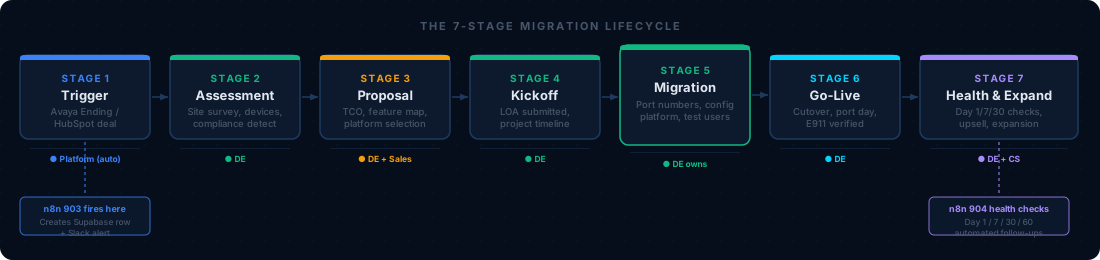
“Every migration follows this path. Stages 2, 5, and 6 are where DE time is concentrated.”
| Stage | Name | Who owns it | Typical duration | Your exit criteria |
|---|---|---|---|---|
| 1 | Avaya Ending / Trigger | Platform (automated) | Hours | HubSpot deal reaches Closed Won, n8n 903 fires |
| 2 | Assessment | DE | 5–10 business days | Assessment questionnaire complete, network validated |
| 3 | Proposal / Design | DE + Sales | 3–5 business days | Feature map done, compliance gates clear, design doc signed off |
| 4 | Kickoff | DE | 1–2 business days | Customer kickoff call held, project timeline sent |
| 5 | Migration Execution | DE | 2–6 weeks (varies by complexity) | Porting order submitted, platform provisioned, testing complete |
| 6 | Go-Live | DE | 1 day | All numbers ported, E911 tested, users on new platform |
| 7 | Health & Expand | DE + CS | 60 days post-live | Day 1/7/30/60 health checks complete, upsell opportunities logged |
What n8n Workflow 903 Does Automatically
The moment a HubSpot deal moves to Closed Won, n8n workflow 903 fires. Here’s what it does without you touching anything:
“Workflow 903 runs automatically — your job is to acknowledge it in #migrations and pick up from Stage 2. If it doesn’t fire, check the Executions tab and trigger it manually (see 09-tools-and-systems
- Stage 1: Fires an MSP/internal alert, logs to Splunk
- Stage 2: Generates and emails the assessment questionnaire to the customer
- Stage 3: Runs the TCO calculator, generates feature map, creates a draft proposal
- Stage 4: Creates a PSA ticket, schedules a kickoff call via Calendly, sends a kickoff packet to the customer
- Stage 5: Initializes the porting tracker in Supabase, logs LOA-pending status
- Stage 6: Posts the go-live checklist to
#migrationsin Slack
What it does NOT do: It does not verify the customer actually completed the assessment, does not submit the LOA (you do that), does not press any buttons in the carrier portal (you do that), and does not test call quality. The automation handles coordination; the engineering is yours.
Stage 1 — Trigger
What happened before you received this
The sales team moved the HubSpot deal to “Closed Won.” By the time you touch this, the following should already be true:
- Supplier chosen (RingCentral, 8x8, Net2Phone, CBTS/Webex, AireSpring, or XTIUM)
- Seat count confirmed (accurate — not a ballpark)
- Contract term (12, 24, or 36 months)
- Compliance flags noted (HIPAA/PCI/FERPA/FedRAMP — yes or no)
- Multi-location: yes or no
- Main IT contact + main executive contact
- Any specialty hardware noted (paging, fax, analog lines)
If any of these are missing, flag immediately in #migrations. Do not proceed to Stage 2 until you have this information. The sales team is responsible for the handoff packet — you are responsible for not accepting an incomplete one.
Your actions in Stage 1
- Acknowledge the handoff in
#migrations - Read the full HubSpot deal record
- Confirm the webhook payload schema is correct in Supabase (check
migrationstable for the new row) - Email the customer a brief introduction: who you are, what the next step is, what they need to prepare
Stage 2 — Assessment
This is your most important stage. Every problem you don’t find here will find you on go-live day.
What the automation sends
n8n 903 sends an 8-section questionnaire to the customer automatically. It covers: Avaya product identification, seat count and extension ranges, analog lines, SIP trunk configuration, call flow documentation, integrations, compliance requirements, and contract status.
What you do on top of that
The questionnaire is self-reported. You verify it.
Network assessment (run this yourself or have the customer IT team run it):
# From a PC on the customer network:
# 1. Speed test — speedtest.net or fast.com
# 2. Jitter / packet loss — ping 8.8.8.8 -n 500 (Windows) or ping -c 500 8.8.8.8 (Mac/Linux)
# 3. SIP ALG check — ask the customer's firewall admin
# 4. Available bandwidth during peak hours
Call flow documentation: Get a whiteboard diagram or a call tree description from the customer. Auto-attendant menus, after-hours routing, hunt group order, voicemail-to-email addresses — write all of this down. You’ll re-create it on the new platform.
Extension inventory: Every extension, every user, every device. If they have 80 seats but 112 extensions (conference rooms, park orbits, overhead paging extensions), you need to know all 112.
Analog line inventory: The most commonly forgotten. Walk through the building (virtually or have their IT do it) looking for fax machines, door phones, overhead paging, elevator phones. Each one requires a decision: migrate with an ATA adapter, replace with a SIP device, or leave on a POTS line.
Assessment exit criteria
- Avaya product type and version confirmed
- Exact seat count and extension range documented
- All analog devices inventoried with disposition decision
- Network speed test results on file (download, upload, jitter, packet loss)
- Firewall / QoS status confirmed
- All call flows documented (auto-attendant, hunt groups, after-hours, emergency)
- All integrations identified (CRM, helpdesk, recording, call accounting)
- Compliance vertical confirmed in Supabase
- E911 addresses documented for every site
Stage 3 — Proposal / Design
What the automation does
- Runs
feature_mapper.pyto produce a feature gap matrix (Avaya vs. chosen supplier) - Runs
tco_calculator.pyto generate the savings comparison - Produces a draft proposal
What you do
Review the feature map. Look at every row with status addon, limited, workaround, or missing. Each one requires a decision and customer sign-off before go-live. Common gaps:
- Overhead paging: almost always
workaround(requires SIP paging adapter) - Analog device support: usually
limited(ATA required) - Fax:
workaroundon most platforms (eFax or T.38 gateway) - Call recording:
addonorlimitedon budget platforms
Run the compliance gate before proceeding:
python3 execution/compliance_checker.py --migration-id <uuid> --can-advance --stage 3If blocked, resolve the Stage 3 requirements before design sign-off.
Design document: Produce a one-page design doc for the customer covering:
- Target platform and tier
- Seat count and user types
- Auto-attendant menu structure (recreated from your call flow doc)
- Hunt group configuration
- Number porting scope (which numbers, which carrier)
- Analog device plan (ATA model, quantity, location)
- Go-live target date with buffer
The customer signs this document before you order anything.
Stage 4 — Kickoff
The kickoff call is 45–60 minutes. n8n 903 schedules it automatically. Your agenda:
- Introductions (5 min) — who’s who on both sides
- Project timeline review (10 min) — walk the customer through every milestone and date
- Customer homework (15 min) — what you need from them: extension list CSV, admin access to their Avaya system, contact for number porting LOA, firewall admin contact
- Go-live day logistics (10 min) — time window, who’s on site, backup plan
- Q&A (10 min)
After the call: update Supabase with kickoff date, send the kickoff packet email (n8n 903 handles this), post kickoff status to #migrations.
Stage 5 — Migration Execution
This is where you spend most of your time. Three parallel workstreams:
Workstream A: Number Porting
See 04-number-porting.md for full detail. Summary:
- Submit LOA to the target carrier’s porting department
- Monitor FOC date confirmation
- Prepare port-day runbook
- Timeline: typically 15–30 business days for most US carriers
Workstream B: Platform Provisioning
See 05-platform-configuration.md for per-supplier detail. Summary:
- Create tenant/account on the target platform
- Bulk-create users (CSV import or API)
- Configure auto-attendants, hunt groups, voicemail
- Set up analog device adapters
- Configure integrations (CRM, helpdesk)
- Set E911 addresses per site per user
Workstream C: Testing
- Internal call test: Extension to extension calling before porting
- Outbound PSTN test: Dial out from the new platform (use temporary numbers the carrier provides)
- Inbound test: Have someone call the temporary numbers
- E911 test: Dial 933 or test via platform dashboard — verify address for each site
- Feature test: Auto-attendant, hunt groups, voicemail-to-email, call recording, paging
- Failover test: Simulate internet outage — does the platform’s failover number ring?
Hard gate before going live:
python3 execution/compliance_checker.py --migration-id <uuid> --can-advance --stage 5If blocked, do not proceed to go-live. Resolve all requirements and sign off in Supabase.
Stage 6 — Go-Live
The most stressful part. See 06-cutover-playbook.md for the full hour-by-hour plan. Summary:
- Preferred window: 2am–4am on a Tuesday or Wednesday (minimize call volume impact)
- Keep old PSTN trunk live for 48 hours post-cutover (rollback capability)
- Porting happens at the time confirmed by the carrier on FOC — you cannot change this day-of
- Verify E911 at every site within 1 hour of cutover
- Call every office location to confirm phones are up
- Monitor Splunk for health check events for the first 4 hours
Stage 7 — Health & Expand
Automated health checks run at Day 1, 7, 30, and 60 (workflow 904). They score:
- Call quality (MOS, jitter, latency, packet loss)
- User adoption (% of seats active)
- Feature utilization
- NPS / CSAT (short survey sent to customer)
Your role: Review the health check score in Supabase. If any category is below threshold, investigate and fix. Call the customer at Day 7 and Day 30 regardless of score — a customer who hears from you proactively stays a customer.
Upsell triggers (route back to sales team):
- Any site mentioning contact center needs
- Compliance recording add-on not yet purchased
- New office opening or seat expansion
- SD-WAN interest (common after they see UCaaS working well)
What failure looks like at each stage — and how to recover
| Stage | Common failure | Recovery |
|---|---|---|
| 2 | Assessment is incomplete — undisclosed fax machine or analog device discovered in Stage 5 | Stop porting. Solve the analog problem first. Push the go-live date. |
| 3 | Feature gap not disclosed to customer — discovers it on go-live day | Customer escalation. Fix with workaround, set clear timeline, document in HubSpot. |
| 4 | Customer not engaged — slow response, can’t get admin access | Escalate to their executive contact. Sales team may need to intervene. |
| 5 | FOC date slips — carrier delays the port | Push go-live date. Communicate to customer immediately. Never go live without an FOC confirmation. |
| 6 | Porting fails on cutover night | Activate 48-hour rollback: PSTN trunk is still live. All calls continue on Avaya. Diagnose and reschedule. |
| 7 | Poor call quality post-live | Run network diagnostics. Check QoS config, bandwidth, codec settings. Escalate to carrier if needed. |
Related Articles
- 03 — Assessment and Discovery — Full detail on Stage 2
- 04 — Number Porting — Full detail on Stage 5 porting workstream
- 05 — Platform Configuration — Full detail on Stage 5 provisioning workstream
- 06 — Cutover Playbook — Full detail on Stage 6
- 09 — Tools and Systems — HubSpot stage mapping, n8n workflow triggers, Splunk health checks
- Pre-Migration Checklist — The gate document that must be signed before Stage 5 → Stage 6