Pre Migration Checklist
Sign Off the Pre-Migration Checklist
Summary: Complete and sign this checklist before every migration reaches Stage 5 (Migration Execution). Every unchecked box is a potential cutover failure.
Doc type: How-To Guide / Gate Checklist | Audience: Deployment Engineer (technical) | When to use: One week before the scheduled go-live date, at minimum.
Before You Start
- You are the DE assigned to this migration in HubSpot and Supabase
- The customer has signed the contract and the HubSpot deal is in Stage 4 (Proposal Accepted)
- You have completed the Stage 2 assessment and the full platform provisioning
- You have access to the customer’s carrier invoice(s), admin consoles for both the old Avaya system and the new platform, and the Supabase
migrationstable
“This checklist applies when the HubSpot deal is in Stage 4. Complete it, then move the deal to Stage 5 to trigger the migration workflow in n8n.”
How to use this checklist: Print it. Check boxes physically. If a box cannot be checked, document the blocker in #migrations and do not proceed until the blocker is resolved. Do not estimate or assume — verify each item.
Migration ID: ____________________________
Customer: ____________________________
Target Platform: ____________________________
DE: ____________________________
Date completed: ____________________________
Section 1 — Assessment Complete
These must come from your own Stage 2 assessment — not from the sales proposal, which may be estimated rather than verified.
- Avaya product type and version confirmed (IP Office 500, IP Office V2, Aura, etc.)
- Exact seat count confirmed — record here:
_______ seats - Extension count confirmed (seats and extensions differ — a 50-seat deployment may have 80 extensions):
_______ extensions - All sites identified with physical addresses:
- Site 1:
____________________________ - Site 2:
____________________________ - Site 3:
____________________________
- Site 1:
- All analog devices inventoried:
_______ fax machines | _______ paging systems | _______ door phones | _______ other - Analog device dispositions confirmed for each device (eFax, ATA, SIP replacement, or remain on POTS)
- All call flows documented: auto-attendants, hunt groups, after-hours routing, holiday routing, emergency routing
- All integrations identified: CRM, helpdesk, call recording, call accounting
- Assessment summary document saved to Google Drive and linked in the HubSpot deal
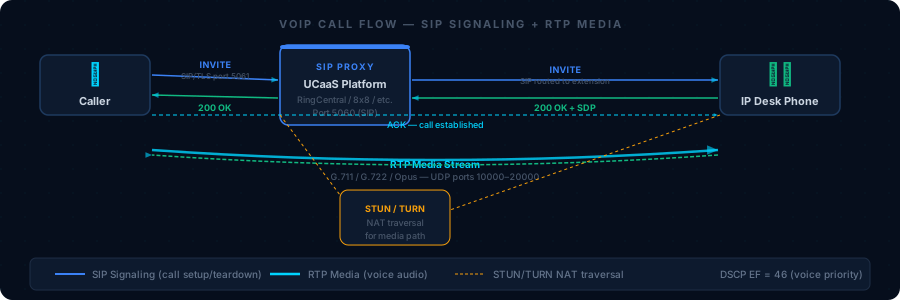
“The assessment document is the source of truth for this section. If it doesn’t exist, the assessment isn’t complete — stop here.”
Section 2 — Number Porting Ready
-
All DIDs inventoried — copy of carrier invoice collected and filed
-
Carrier(s) identified:
____________________________ -
LOA completed with: exact legal business name, service address, account number, BTN, and authorized signature
-
LOA submitted to winning carrier’s porting team
-
Porting order created in
porting_tracker.pyand status isloa_submitted:python3 execution/porting_tracker.py --action status --migration-id <uuid>You should see:
status: loa_submitted(or later stage). If status iscreatedbut notloa_submitted, the LOA has not been filed with the carrier. -
FOC date confirmed with the winning carrier by phone call (not assumed from an automated email):
- FOC date:
____________________________ - FOC time:
____________________________(time + timezone — be explicit, e.g., “4:00 AM Central”)
- FOC date:
-
Toll-free numbers:
_______ TNs— separate LOA submitted:[ ] Yes [ ] N/A -
Multiple carriers:
[ ] No [ ] Yes — separate LOA submitted per carrier account
Section 3 — Network Validated
Run these tests from inside the customer network during business hours — not at night when traffic is light.
- Speed test completed from the customer’s network:
- Download:
_______ Mbps| Upload:_______ Mbps - Required minimum upload for this deployment (calculate: seats × 20% concurrency × 100kbps):
_______ Mbps
- Download:
- Latency to UCaaS platform IP ranges: average
_______ ms(target: <100ms) | max_______ ms - Jitter:
_______ ms(target: <20ms — above 40ms, QoS is not working) - Packet loss:
_______ %(target: <1%) - SIP ALG confirmed DISABLED on customer firewall — model tested:
____________________________ - QoS / DSCP EF (code 46) marking configured for voice traffic:
[ ] Yes [ ] Not configured — risk documented in #migrations - Voice VLAN configured:
[ ] Yes [ ] No — risk documented in #migrations - Firewall ports confirmed open:
- TCP/UDP 5060 and 5061 (SIP signaling)
- UDP 10000–20000 (RTP media — bidirectional)
- TCP 443 (admin console and softphone)
- Secondary internet / failover connection:
[ ] Yes [ ] No — risk documented in #migrations
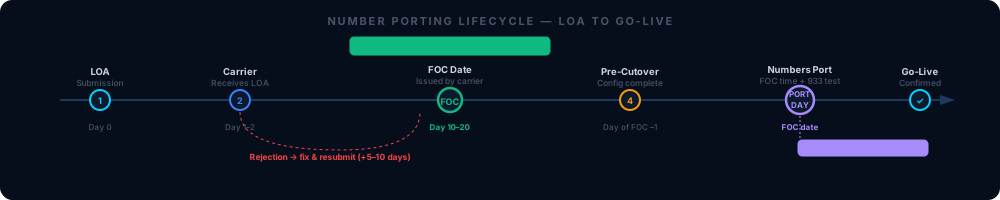
“Run this test during business hours when the network is under normal load. A clean result at 2am doesn’t reflect what happens when 50 people are on calls and video at 10am.”
Section 4 — Platform Provisioned
- Customer tenant / account created on target platform
- All sites created with correct physical addresses (these become E911 ERLs in Section 6)
- All users imported: bulk CSV for 20+ users, manual entry for smaller deployments
- Extensions assigned — confirm no two users share the same extension number
- Licenses assigned — seat count in platform matches contract seat count
- Auto-attendants configured and match the documented call flow from Section 1
- Hunt groups configured: ring type (sequential, simultaneous, or round-robin), member order, ring duration, overflow destination
- Voicemail-to-email configured for every user who needs it — email addresses verified
- Paging:
[ ] Configured and tested [ ] N/A - Call recording:
[ ] Configured and tested [ ] N/A - CRM integration:
[ ] Configured and tested [ ] N/A - Analog device adapters (ATAs):
[ ] Configured and tested [ ] N/A - Desk phones:
[ ] Autoprovisioned and showing Registered in admin console [ ] Manual provisioning complete - DID routing configured: every ported number has an explicit inbound route to the correct destination
“Before signing off Section 4, every user should appear Active and licensed. Any user showing Unregistered or Unlicensed must be resolved.”
Section 5 — Testing Complete
Run every test from an outside line or external cell phone — not from within the customer’s own phone system.
- Extension-to-extension calling: Made at least 3 internal calls between different extensions. Both audio directions work ✅
- Outbound calling: Dialed an external cell phone from the platform — call connected, caller ID shows customer’s main number ✅
- Inbound calling: Called a temporary DID from an outside line — rang the correct destination ✅
- Auto-attendant test: Called the main number from an outside line, navigated every single menu option, confirmed each routes to the documented destination ✅
- Hunt group test: Called each hunt group DID from an outside line, confirmed the ring sequence and overflow work correctly ✅
- Voicemail test: Left a voicemail from an outside line, confirmed email notification arrived at the correct address ✅
- Feature tests:
- Call hold and resume — put a call on hold, resume, confirm no audio disruption ✅
- Blind call transfer — transfer a call to another extension without announcing it ✅
- Attended call transfer — announce the transfer, complete it ✅
- Conference call — 3-way call with an external number ✅
- Call park and pickup (if configured) ✅
- Fax test:
[ ] Sent and received a test fax on the fax number [ ] N/A - Paging test:
[ ] Paged from a desk phone, confirmed audio at all zones [ ] N/A - Recording test:
[ ] Made a recorded call, confirmed recording appears in Admin Console within 2 minutes [ ] N/A - Mobile app test:
[ ] Called from mobile app on LTE (not Wi-Fi), confirmed audio quality ≥4.0 MOS [ ] N/A - Failover test:
[ ] Confirmed inbound calls route to failover number if main internet is disconnected [ ] Documented risk — no failover configured
“The call log is your proof that testing happened. Screenshot this view with your test calls visible and attach it to the Google Drive assessment folder.”
Section 6 — E911 Verification
E911 is a life-safety requirement. Do not treat this section as administrative.
-
Emergency Response Location (ERL) entered for every site in the platform admin console — including branch offices, satellite locations, and any site with a phone
-
933 test completed at every site — dial from a physical phone at that site, confirm address read back:
Site Name Physical Address 933 Result Tested By Date ________________________________________[ ] Correct [ ] Wrong________________________________________________________________[ ] Correct [ ] Wrong________________________________________________________________[ ] Correct [ ] Wrong________________________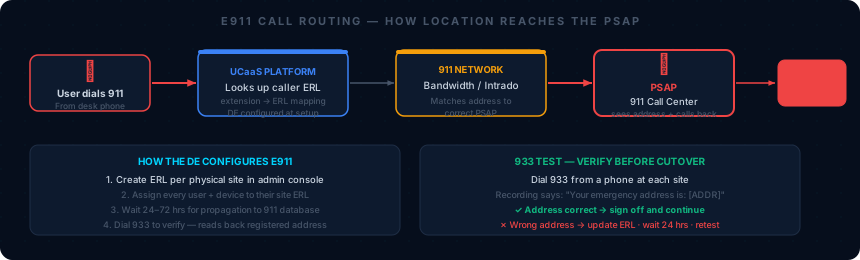
“Every site with a phone must have an ERL. ‘Main Office ERL assigned to all users’ is a misconfiguration if users are at different physical locations — branch office employees would send 911 to headqu
You should hear when dialing 933: A recorded message reading back the street address, suite, city, state, and zip of the site. If the address is wrong or the call doesn’t connect, resolve before proceeding. See Knowledge Base: E911 Reference.
-
For WFH / remote users: E911 location update policy documented, and all affected users have been instructed on how to update their emergency address in the softphone app
Section 7 — Compliance Gate
-
Compliance vertical confirmed:
[ ] HIPAA (HealthComm) [ ] PCI-DSS (SecureVoice) [ ] FedRAMP (GovConnect) [ ] FERPA (EduComm) [ ] None -
Stage 5 gate check run:
python3 execution/compliance_checker.py --migration-id <uuid> --can-advance --stage 5You should see:
Compliance gate: PASS. Exit code 0.If you see exit code 2, the output lists every incomplete requirement. Complete each requirement and sign off using:python3 execution/compliance_checker.py --migration-id <uuid> --sign-off --requirement <name> --signed-by <your-email>Then re-run the gate check. Do not proceed until exit code 0.
-
Gate check result:
[ ] Exit code 0 — PASS [ ] Exit code 2 — BLOCKED (resolve before proceeding) -
All compliance sign-offs recorded in Supabase with your email address as
signed-by
Section 8 — Go-Live Readiness
- FOC date locked — customer IT and executive sponsor notified of exact date and time
- Cutover window confirmed with customer IT:
____________to____________ - Pre-cutover customer email sent (3 days before go-live — template in 06 — Cutover Playbook)
- Rollback plan confirmed:
- Old Avaya PSTN trunk is active and will remain active for 48 hours post-cutover
- Carrier porting NOC emergency number written down:
____________________________
- Cutover contact card complete — every number written on paper (not just stored in phone):
- Customer IT primary name/number:
____________________________ - Customer executive name/number:
____________________________ - Carrier porting NOC:
____________________________ - UCaaS platform NOC:
____________________________ - Manager on-call name/number:
____________________________
- Customer IT primary name/number:
- Cutover day checklist printed and ready (
checklists/cutover-day-checklist.md)
Sign-Off
All boxes above are checked. No blockers remain. This migration is cleared for go-live.
Deployment Engineer: _______________________ Date: _______________
Reviewer (senior DE or manager): _______________________ Date: _______________
Do not proceed to Stage 5 if this checklist is not fully signed. Moving the HubSpot deal to Stage 5 triggers n8n workflow 903 and marks the migration as active in Supabase. The stage should not advance until this gate is cleared.
Related Articles
- 06 — Cutover Playbook — What happens on cutover night, step by step
- Cutover Day Checklist — Print-and-carry companion for the cutover window
- 04 — Number Porting — LOA requirements, FOC process, carrier-specific notes
- Knowledge Base: E911 Reference — Platform-specific E911 config and 933 test details
- Knowledge Base: Network Requirements — Bandwidth calculator, QoS config, firewall port list
- 08 — Compliance Requirements — Full compliance sign-off steps