Compliance Requirements
Clear the Compliance Gate Before Go-Live
Summary: This guide explains what each compliance vertical requires, how to use
compliance_checker.pyto detect and track requirements, and how to sign off each gate before Stage 5.
Doc type: How-To Guide + Reference | Audience: Deployment Engineer (technical) | Platform: compliance_checker.py CLI + Supabase + Splunk
Before You Start
- You have the migration UUID for this project (
migration_id) - You know the customer’s industry (this determines which vertical applies)
- You have your CMTG email address (
yourname@cloudmagicgroup.com) — used as thesigned-byvalue in all sign-offs - You have access to the UCaaS platform’s admin console and the customer’s compliance contact
The compliance gate is not optional. A compliance failure after go-live is a regulatory incident with legal consequences. A gate block before go-live is just a checklist item — resolve it and move on.
How the Compliance System Works
Step 1 — Detect the Vertical
Run this once when you first open the migration:
python3 execution/compliance_checker.py --migration-id <uuid> --industry "healthcare"Valid industry strings (case-insensitive, partial match accepted):
| Vertical | Triggered by |
|---|---|
| HIPAA (HealthComm) | healthcare, medical, hospital, clinic, dental, pharmacy |
| PCI-DSS (SecureVoice) | finance, banking, insurance, financial, credit, lending |
| FedRAMP (GovConnect) | government, federal, state, municipal, military, defense |
| FERPA (EduComm) | education, university, college, school, k12, district |
You should see: The detected vertical printed to stdout, and the
migrations.metadata["compliance"]["vertical"]field updated in Supabase. If the industry doesn’t match any vertical, no compliance requirements are added and the standard checklist applies.
Step 2 — Check Current Status
python3 execution/compliance_checker.py --migration-id <uuid> --check-status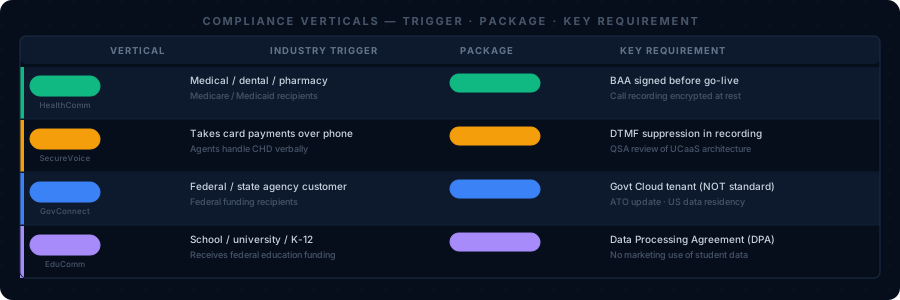
“This is your compliance dashboard. Any requirement showing pending must be resolved before the Stage 5 gate will clear.”
You should see: A list of all requirements for the detected vertical, each marked
pendingorsigned. Add--jsonto get machine-readable output for integration with other scripts.
Step 3 — Sign Off a Requirement
When you’ve completed a requirement, record it in the system:
python3 execution/compliance_checker.py --migration-id <uuid> \
    --sign-off \
    --requirement <requirement_name> \
    --signed-by "yourname@cloudmagicgroup.com"
You should see: A confirmation line:
Signed off: <requirement_name> by yourname@cloudmagicgroup.com at [timestamp]. This also emits acompliance_signoffevent to Splunk with your name, the requirement, and the timestamp. Every sign-off is auditable.
Step 4 — Run the Stage Gate
Before advancing to Stage 3 (Proposal) and before Stage 5 (Go-Live), run the gate check:
# Stage 3 gate — run before the proposal is signed
python3 execution/compliance_checker.py --migration-id <uuid> --can-advance --stage 3

# Stage 5 gate — must pass before go-live
python3 execution/compliance_checker.py --migration-id <uuid> --can-advance --stage 5
You should see:
Compliance gate: PASS. Exit code 0.— clear to advance.If you see exit code 2, the output lists every unsatisfied requirement by name. Complete each one and sign it off, then re-run the gate. Repeat until exit code 0.
“Exit code 2 is not an error — it’s a list of your remaining work. Resolve each item in order, sign off, and re-run the gate until you see exit code 0.”
HIPAA — HealthComm
Triggered by: Healthcare, medical, hospital, clinic, dental, pharmacy
Why it matters: Patient names, conditions, appointment details, and prescription information are Protected Health Information (PHI) under HIPAA. When a UCaaS platform handles any call that might contain PHI, it becomes a Business Associate under HIPAA and requires a Business Associate Agreement (BAA).
Stage 3 Requirements (complete before proposal is signed)
| Requirement | What to do | Sign-off command |
|---|---|---|
hipaa_phi_inventory_partial | Interview the customer: which call types involve patient information? (Appointment confirmations, clinical discussions, prescription calls, billing — all are PHI.) Document the list. | --requirement hipaa_phi_inventory_partial |
Stage 5 Requirements (complete before go-live)
| Requirement | What to do | Where to do it |
|---|---|---|
hipaa_baa_signed | Execute the Business Associate Agreement between the customer and the UCaaS provider. This must happen before the platform goes live — not after. | Request the BAA through the platform’s HIPAA portal. Have the customer countersign. File in Google Drive. |
phi_inventory_complete | Complete a full PHI flow worksheet with the customer’s compliance officer. Document every call type that may involve PHI. | Complete the worksheet template in Google Drive. |
encryption_verified | In the Admin Console, verify: TLS for SIP signaling, SRTP for media streams, encryption at rest for voicemail and call recordings. | Platform Admin Console → Security or Admin Console → Recording Settings depending on platform. |
audit_logging_enabled | Enable CDR (Call Detail Record) retention. HIPAA requires 6 years (72 months) minimum. | Admin Console → Call Logs → Retention Policy — set to 72 months. |
breach_response_plan_signed | Customer’s HIPAA Incident Response Plan must be updated to include the UCaaS platform as a system in scope. | Customer’s compliance officer must confirm the IRP has been updated. |
“Encryption verification is not just checking a box — confirm the platform documentation confirms TLS 1.2+ for SIP and SRTP for media. Standard tiers may not include SRTP without the HIPAA package.”
Critical notes:
- Request the HIPAA/BAA tier explicitly when provisioning the platform. The standard tier does not automatically include a BAA on any of our 6 platforms.
- If the customer records calls, confirm call recording storage is explicitly covered by the BAA — voicemail and recordings are stored PHI.
- If softphone users access calls on personal devices, confirm the mobile app does not cache voicemail locally in violation of the customer’s HIPAA policy.
PCI-DSS — SecureVoice
Triggered by: Finance, banking, insurance, financial, credit, lending
Why it matters: If callers speak credit card numbers to agents over the phone, the phone system is potentially in PCI scope. The goal is to de-scope the phone system — implement controls so that card data never passes through UCaaS in a usable form.
Stage 3 Requirements
| Requirement | What to do |
|---|---|
pci_scope_assessed | Map which call flows might involve card numbers. Ask the customer: “Do callers speak their card numbers to agents, enter them via keypad, or neither?” This answer determines which de-scoping method applies. |
Stage 5 Requirements
| Requirement | What to do | Where to do it |
|---|---|---|
call_recording_descoped | Implement one of three de-scoping methods (see below). | Admin Console → Call Recording Settings |
tokenization_confirmed | Verify no raw card numbers (PANs) pass through the voice channel in plaintext. | Confirm with the customer’s payment processor. |
qsa_approval_obtained | The customer’s QSA (Qualified Security Assessor) must review and approve the UCaaS architecture for their annual PCI audit. | Provide your architecture diagram + de-scoping method documentation to the QSA. |
Three de-scoping methods:
Method 1: DTMF suppression (preferred) The caller enters card digits via keypad. The UCaaS platform replaces the DTMF tones with silence or generic tones in recordings. Card numbers never appear in any log or recording.
- Configure in: Admin Console → Call Recording → DTMF Suppression (feature name varies by platform)
- Verify: Make a test call, have the “caller” press card digits, review the recording — the digits should be silent
Method 2: Pause/resume recording The agent manually pauses recording before asking for card data and resumes after.
- Configure in: Admin Console → Users → [User] → Recording Controls — enable pause/resume
- Limitation: Relies on agent compliance — less reliable than DTMF suppression
Method 3: Out-of-band payment capture The agent sends the caller a secure payment link. Card data never enters the voice channel.
- Requires a separate payment link system (outside UCaaS scope)
- Cleanest PCI solution — card data never touches the phone system at all
You should see after enabling DTMF suppression: A test recording where the caller pressed card digits shows silence during that period. Verify in Admin Console → Call Recordings → [Test Recording].
Timeline note: QSA approvals take time. If the customer has a PCI audit coming up, engage their QSA during Stage 3 — not Stage 5.
FedRAMP — GovConnect
Triggered by: Government, federal, state, municipal, military, defense
Why it matters: Federal agencies (and many state/local agencies receiving federal funding) must use FedRAMP-authorized cloud services. All data must remain within the continental United States.
Stage 3 Requirements
| Requirement | What to do |
|---|---|
fedramp_platform_confirmed | Verify the proposed UCaaS platform has FedRAMP authorization. Check at marketplace.fedramp.gov — search for the platform name. |
FedRAMP-authorized platforms (verify current status at marketplace.fedramp.gov):
| Platform | Status | Notes |
|---|---|---|
| RingCentral Government | FedRAMP Authorized (Moderate) | Separate product — must provision a Government tenant, not standard RingCentral |
| Webex Calling Government | FedRAMP Authorized | CBTS Government Cloud — separate from commercial Webex |
| Zoom for Government | FedRAMP Authorized (Moderate) | Separate product from standard Zoom Phone |
| 8x8 | Not FedRAMP authorized | Do not propose for federal government customers |
| Net2Phone | Not FedRAMP authorized | Do not propose for federal government customers |
| AireSpring | Not FedRAMP authorized | Do not propose for federal government customers |
If the customer is a federal agency and the proposed platform is not FedRAMP authorized, stop and escalate to sales. The deal cannot proceed with that platform.
“Always verify FedRAMP status on the marketplace before proposing a platform to a government customer. Authorization status can change — do not rely on marketing materials.”
Stage 5 Requirements
| Requirement | What to do | Notes |
|---|---|---|
data_residency_us_only | Confirm with the platform’s FedRAMP documentation that all data centers are US-located and no foreign subprocessors have access. | Available in the platform’s FedRAMP package (System Security Plan) |
security_assessment_complete | The customer’s ISSM (Information System Security Manager) must complete the UCaaS section of their System Security Plan (SSP). | Government customer internal process — your role is to provide the architecture documentation they need |
ato_documentation | The customer’s ATO (Authorization to Operate) must be updated to include the new UCaaS platform. | ATO updates take 4–8 weeks — start this process at Stage 3 |
Critical: FedRAMP Government Cloud is separate infrastructure from the commercial products. A government customer provisioned on standard RingCentral is not on a FedRAMP-authorized platform. You must explicitly provision the Government Cloud tenant — contact your channel manager for the correct provisioning path.
FERPA — EduComm
Triggered by: Education, university, college, school, k12, district
Why it matters: Educational institutions receiving federal funding must protect student education records under FERPA. Call data involving students (admissions, financial aid, registrar, academic advising) may be considered education records.
Stage 3 Requirements
| Requirement | What to do |
|---|---|
ferpa_review_complete | Meet with the institution’s compliance office. Determine which call flows involve student information (admissions, registrar, financial aid, student counseling). Document the list. |
Stage 5 Requirements
| Requirement | What to do |
|---|---|
student_data_inventory | Document which call types involve student education records and how those calls are handled (recorded, stored, access-controlled). |
no_marketing_use_confirmed | Verify the UCaaS provider’s Data Processing Agreement (DPA) explicitly prohibits using call data for training AI models, service improvement, or any marketing purpose. All 6 standard platforms have acceptable DPAs — verify you’re using the correct tier for education. |
parent_consent_flow_documented | For K-12 districts: document how parental consent is handled for any call recording involving minors. This is a policy decision for the institution — your role is to document that the policy exists. |
FERPA + HIPAA co-application: University hospitals, medical schools, and dental school clinics often trigger both FERPA and HIPAA. When both apply, flag to your manager — these deployments require compliance counsel involvement beyond standard DE sign-off.
No Compliance Vertical Detected
If the compliance checker returns no vertical, the migration has no additional compliance requirements beyond platform defaults: TLS/SRTP encryption and E911. The standard pre-migration checklist applies.
Compliance Documentation at Migration Close
For every regulated deployment, produce a compliance report at closeout:
python3 execution/compliance_checker.py \
    --migration-id <uuid> --check-status --json > compliance_report_<customer>_<date>.json
Provide this JSON to the customer’s compliance officer. It documents:
- Which vertical was detected and why
- Which requirements were signed off
- Who signed off each requirement and when
- The Splunk audit trail reference
You should see: A valid JSON file containing the full compliance record. Open it and confirm the
signed_byfields are populated for every requirement before delivering it to the customer.
What to Do If the Gate Is Blocked
| Symptom | Fix |
|---|---|
Exit code 2 with hipaa_baa_signed blocked | Arrange BAA execution with the UCaaS provider’s HIPAA team before proceeding |
Exit code 2 with qsa_approval_obtained blocked | Schedule a QSA review — get your architecture documentation to the customer’s QSA |
Exit code 2 with fedramp_platform_confirmed blocked | Platform may not be FedRAMP authorized — escalate to sales |
Exit code 2 with ato_documentation blocked | ATO update is in progress — confirm timeline with customer ISSM; plan 4–8 weeks |
Full step-by-step diagnosis: 07 — Troubleshooting, Issue 16
Related Articles
- Knowledge Base: Compliance Verticals — Deep-dive on the why behind each vertical’s requirements
- Pre-Migration Checklist: Section 7 — Where to record the Stage 5 gate pass result
- 07 — Troubleshooting, Issue 16 — “Compliance gate is blocked” diagnosis steps
- 09 — Tools and Systems — Full Supabase and Splunk schema for compliance events